

What are CEL expressions and why use them?
CEL (Common Expression Language) expressions are powerful, flexible rules that let you automate decision-making across ConductorOne. Instead of manually configuring each policy, group, or automation, you can write expressions that automatically adapt to your organization’s unique needs. CEL is an open-source expression language created by Google. It’s the same technology behind Firebase Rules, Google Cloud IAM conditions, and Kubernetes admission webhooks. ConductorOne extends standard CEL with custom functions for directory lookups, user queries, and access management.Why use CEL expressions?
Automate complex logic: Create sophisticated rules that would be impossible with simple dropdowns or checkboxes. Scale with your organization: As your company grows, expressions automatically adapt to new users, departments, and access patterns. Reduce manual work: Eliminate the need to manually update policies when organizational changes occur. Enforce consistent policies: Ensure the same logic is applied across all access decisions, reducing human error. Integrate with your data: Leverage user attributes, directory information, and access patterns to make intelligent decisions.Where CEL expressions are used
ConductorOne uses CEL expressions in many contexts. Each context provides different variables and expects a specific return type.Primary contexts
| Context | Returns | What it enables |
|---|---|---|
| Policy conditions | true/false | Route requests to different approval workflows based on user, entitlement, or request properties |
| Dynamic groups | true/false | Automatically maintain group membership as users change departments, titles, or attributes |
| Policy step approvers | One or more users | Dynamically select approvers based on manager chains, app owners, or entitlement membership |
All expression contexts
| Context | Returns | What it enables |
|---|---|---|
| Access review filters | true/false | Scope certification campaigns to specific users or accounts |
| Automation triggers | true/false | Fire automations when user or account attributes change |
| Automation steps | varies | Template interpolation and step-to-step data flow |
| Push config filters | true/false | Target users for push rule provisioning |
| Account provisioning | text | Compute dynamic account attributes during grants |
| User attribute mapping | text or list of text | Derive user attributes from existing data |
Each context provides different variables. For example,
subject is available in most contexts, but ctx.trigger is only available in automations. See the expressions reference for details.How expressions work
When you save an expression, ConductorOne validates it immediately. This catches most errors before they can cause problems: Caught when you save:- Syntax errors (missing quotes, parentheses)
- Undefined variables (typos, wrong context)
- Type mismatches (comparing string to number)
- Wrong return type (returning a user when true/false is expected)
- Empty results (looking up a user who doesn’t exist)
- Empty lists (user has no manager)
- Missing profile fields
Context details
Policies - Automate access decisions
CEL expressions power two critical parts of policies: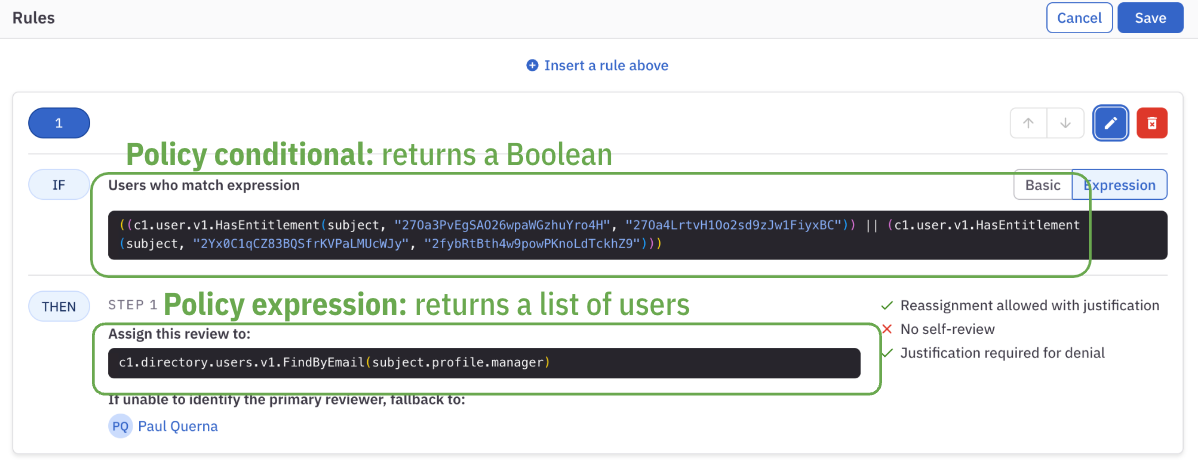
Groups - Create dynamic user collections
Use CEL expressions to define membership for ConductorOne groups: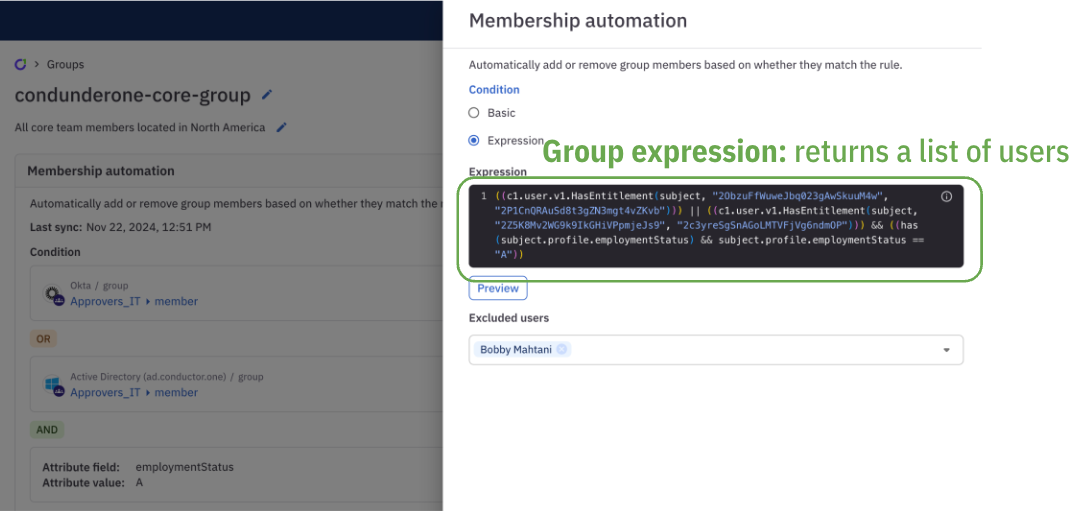
Automations - Trigger intelligent workflows
Fine-tune automations with CEL expressions to control when and how they run: Automation triggers determine when an automation should start based on user changes, access events, or other conditions. Automation steps can include conditional logic to skip steps or modify behavior based on user data. See workflow expressions for details on passing data between steps. Example: Automatically revoke access for users who haven’t logged in for 45 days, but only for non-critical applications.Campaigns - Precisely target access reviews
Use CEL expressions in access review campaigns to precisely define which users, accounts, or access grants should be reviewed: User scope expressions filter which users should be included in the campaign. Account scope expressions filter which app accounts should be reviewed. Example: Review access for all contractors in the Engineering department who have been granted access to production systems.Account provisioning - Map user data intelligently
When configuring account provisioning, CEL expressions transform your user data to match the requirements of target applications: Example: Derive a username from the user’s email address by extracting the part before the @ symbol.Next steps
- Expressions reference - Complete reference for all available objects, functions, and their usage
- Examples and patterns - Practical examples, common patterns, and real-world use cases
- Workflow expressions - Pass data between automation steps using the ctx object
- Troubleshooting - Debug common errors and understand failure modes